> For the complete documentation index, see [llms.txt](https://help.stringeex.com/stringeex-tong-dai-cham-soc-and-quan-ly-khach-hang/llms.txt). Markdown versions of documentation pages are available by appending `.md` to page URLs; this page is available as [Markdown](https://help.stringeex.com/stringeex-tong-dai-cham-soc-and-quan-ly-khach-hang/iii.-mobile-app/android-app/5.-lich-su-cuoc-goi.md).
# 5. Lịch sử cuộc gọi
## Xem lịch sử cuộc gọi
Agent thao tác như hình để vào menu Lịch sử
## Chi tiết liên hệ
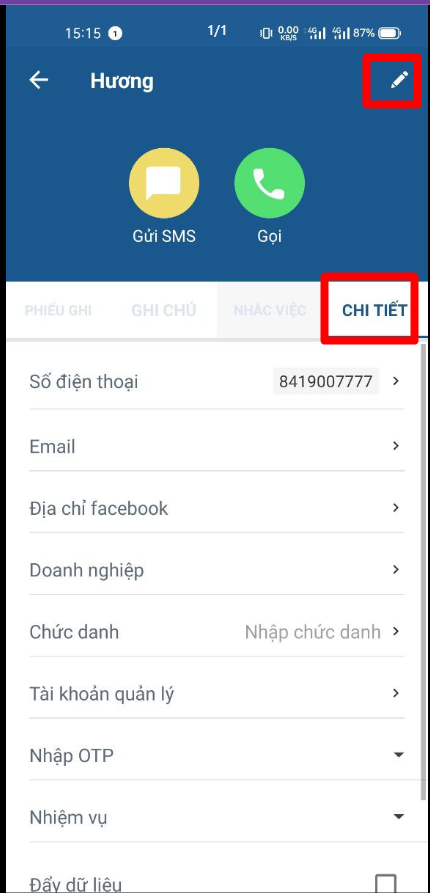
Để xem thông tin chi tiết của liên hệ, người dùng chọn vào liên hệ tương ứng trong lịch sửa cuộc gọi. Với mỗi portal, các trường thông tin "custom" sẽ hiện thị khác nhau. Người dùng cũng có thể cập nhật thông tin liên hệ ngay trên app
Tại giao diện này, người dùng cũng có thể theo dõi các phiếu ghi, ghi chú hoặc tác vụ của khách hàng có liên hệ này tại các tab cùng tên
## Xoá liên hệ
Agent nhấn giữ liên hệ để xoá liên hệ tương ứng