> For the complete documentation index, see [llms.txt](https://help.stringeex.com/stringeex-tong-dai-cham-soc-and-quan-ly-khach-hang/llms.txt). Markdown versions of documentation pages are available by appending `.md` to page URLs; this page is available as [Markdown](https://help.stringeex.com/stringeex-tong-dai-cham-soc-and-quan-ly-khach-hang/en/ii.-system-features/9.-settings/9.2-hr-and-team-management/9.2.1-personnel/agent-list-management.md).
# Agent list management
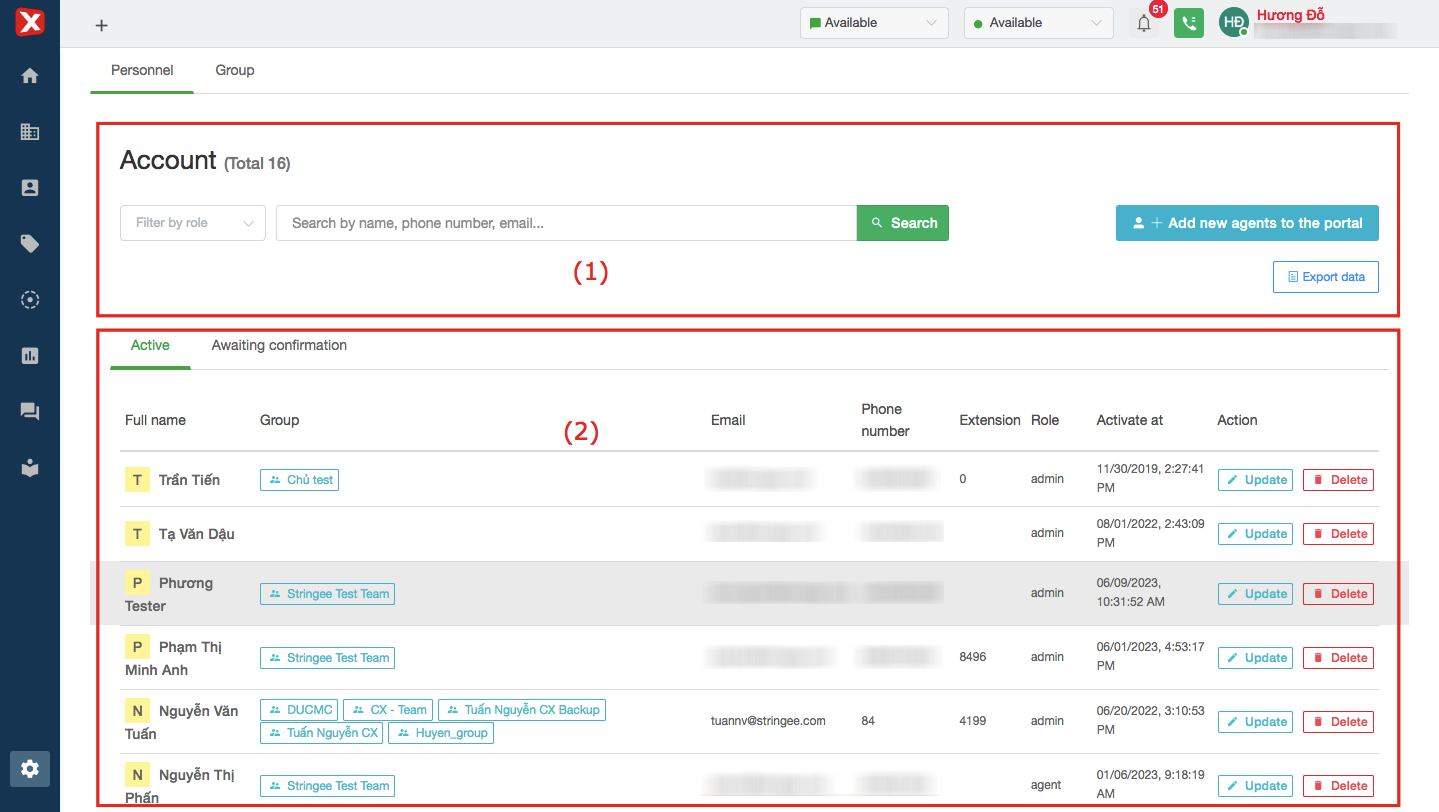
## Account list interface
### (1) Information filter
* **Filter by role:** quickly filter results by role (admin - supervisor - agent)
* **Name, phone number, email:** quickly filter by one of the personnel's name, phone number, and email information
* **Add new agents to the portal:** add new personnel to the portal. In details, refer to how to [add agents to the portal](#them-nguoi-dung-vao-portal)
* **Export data:** export the file of personnel details on the portal to the computer in excel format
### (2) Personnel information
* **Active:**
* **Full name:** the personnel name in portal
* **Groups:** the names of groups to which personnel has been added
* **Email:** the email of respective personnel
* **Phone number:** the agent's phone number. This value is needed to format 84xxxxxxxxx
* **Extension:** the extension number (ext., extension) of respective personnel
* **Role:** the role of the agent on the system
* **Activated at:** when the respective personnel was added
* **Action:**
* **Update:** update agent information, see details below
* **Delete:** remove the user from the portal
* **Awaiting confirmation:**
* **Full name:** the name of the person who was invited to the portal but not yet agreed/unconfirmed
* **Email:** the email of respective personnel
* **Role:** the role of the respective personnel
* **Last Invited from:** the last time the system/admin sent an invitation to join the portal via personnel's email
* **Action:**
* **Resend:** resend the new invitation to the employee's email, the previous invitation will be invalidated
* **Update:** updated invitation (email remains the same, remaining information such as name, role, group subject to change)
* **Delete:** delete sent invitation, previous invitation will be disabled
## Add agents to the portal
In Personnel interface, users click on "Add new agents to the portal" to add new users.
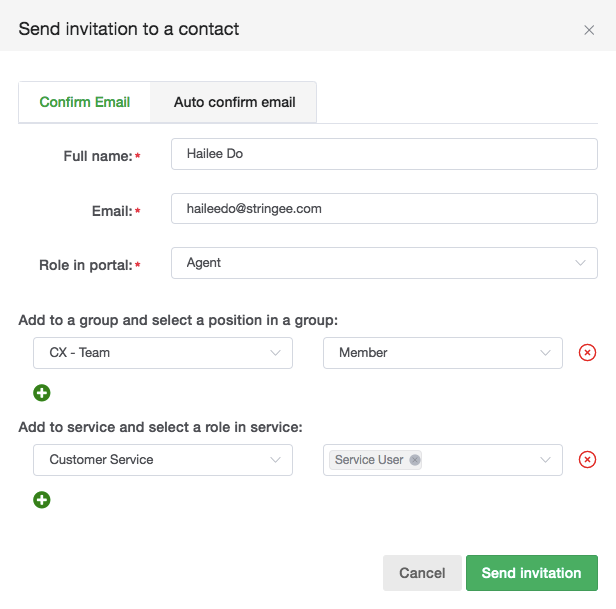
**Confirm email:** Add a new employee to confirm the invitation in the employee's email after the Admin fills in the information and clicks on the "Send invitation" box. The agent checks and follows the instructions in the corresponding email to confirm to join in the portal. Then the agent can start logging in using the portal.
* **Full name:** the displayed name of the personnel on the system after adding.
* **Email:** email to receive invitation (email of personnel used to log in to the system).
* **Role in the portal:** the role of personnel after accepting the invitation (Admin - supervisor - agent).
* **Add to group and select position in group:** add to group and role in corresponding group.
* **Add to service and role in service:** add to service and role in service respectively.
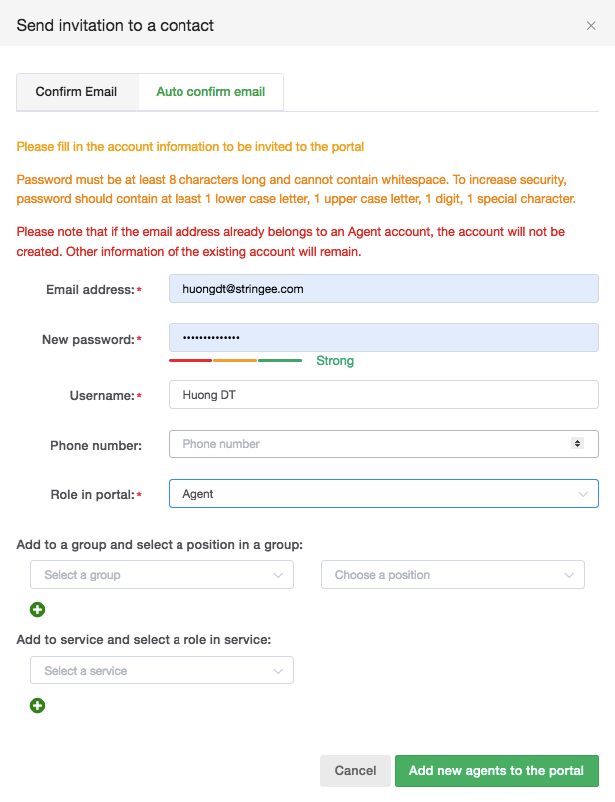
**Auto confirm email:** adding a new employee does not need an email to confirm the invitation. Once done, Admin clicks on the box "Add new agents to the portal" to create a new account.
* **Email address:** user's email used to log in to the system.
* **New password:** password to log in to the system.
* **Username:** the displayed name of the personnel on the system after adding
* **Phone number:** employee's phone number. Note: the phone number needs to be formatted as 84xxxxxxx
* **Role in the portal:** the role of personnel after accepting the invitation (Admin - supervisor - agent)
* **Add to group and select position in group:** add to group and role in corresponding group
* **Add to service and role in service:** add to service and role in service respectively