> For the complete documentation index, see [llms.txt](https://help.stringeex.com/stringeex-tong-dai-cham-soc-and-quan-ly-khach-hang/llms.txt). Markdown versions of documentation pages are available by appending `.md` to page URLs; this page is available as [Markdown](https://help.stringeex.com/stringeex-tong-dai-cham-soc-and-quan-ly-khach-hang/en/iii.-mobile-app/ios-app/7.-set-up-call-notifications-on-the-phone-app.md).
# 7. Set up call notifications on the phone app
## Notes
The illustrations in the manual are used from:
* **Device: Iphone XR**
* **iOS version: 16.0.0**
Because the iOS version may vary, the interface in the manual may be different from the customer's interface.
## Installation steps
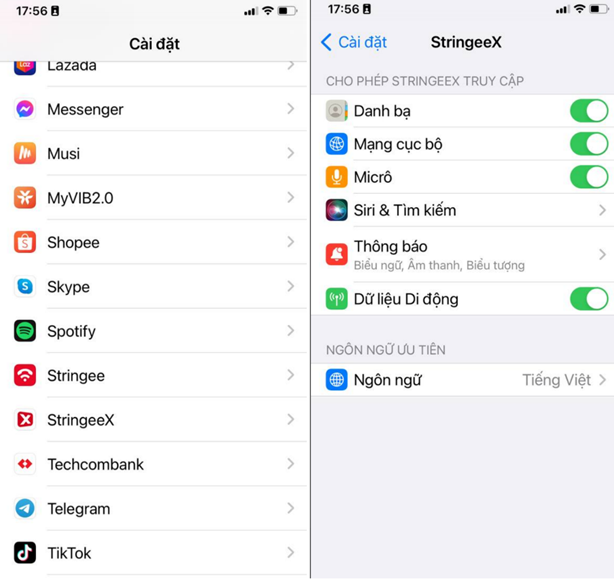
* **Step 1:** At the settings, users go to Settings => StringeeX to set up notification for the StringeeX app
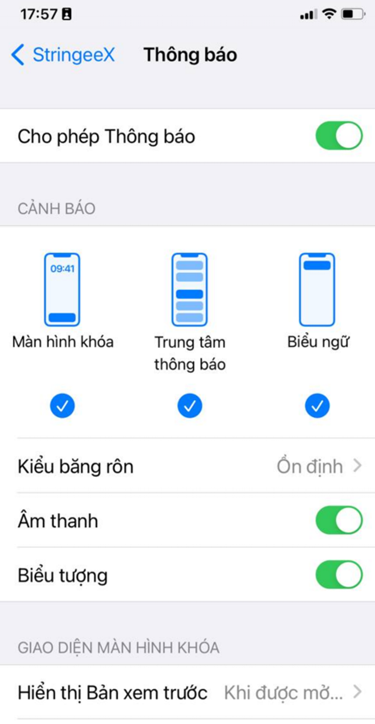
* **Step 2:** Turn on "Allow Notifications". After allowing notifications, check to allow notifications on Lock Screen, Notification Center, Banners. Note: in the section "Banner Style" to select "Persistent":