> For the complete documentation index, see [llms.txt](https://help.stringeex.com/stringeex-tong-dai-cham-soc-and-quan-ly-khach-hang/llms.txt). Markdown versions of documentation pages are available by appending `.md` to page URLs; this page is available as [Markdown](https://help.stringeex.com/stringeex-tong-dai-cham-soc-and-quan-ly-khach-hang/en/ii.-system-features/9.-settings/9.6-other-configurations/9.6.3.-display-permission.md).
# 9.6.3. Display permission
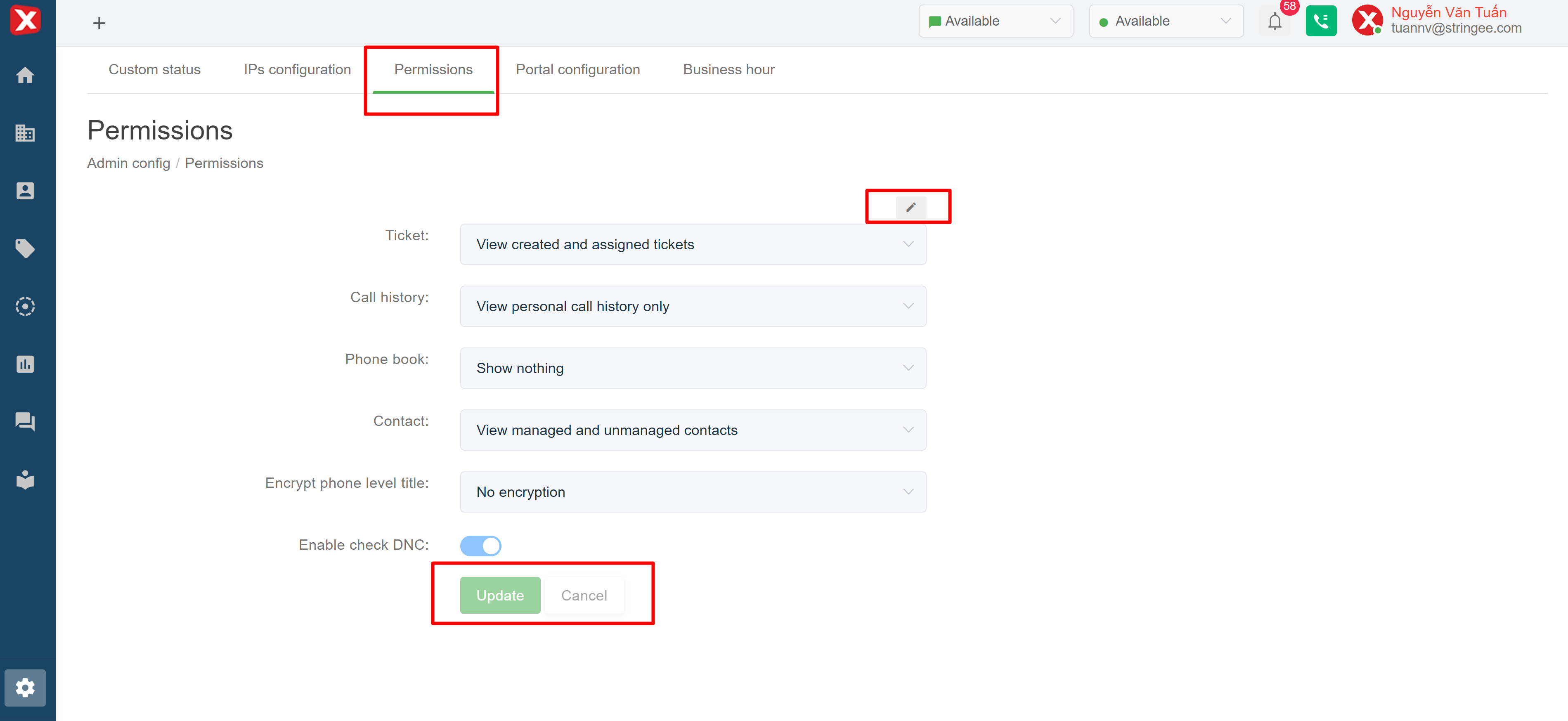
## Display permission interface
In this interface, the admin can change the system settings to suit the company demands for the supervisor and agent roles, the features and configurations include:
* **Ticket:**
* **View all:** agent can view all entries on portal
* **View self-created, assigned and unassigned tickets:** the agent can only view the tickets created by himself, the tickets assigned to him, and the tickets not assigned to any other agent
* **View only self-created or assigned tickets:** the agent can only view the tickets created by himself and the tickets assigned to him
* **Call history:**
* **View my history:** the agent can only see calls at the call history report
* **View all:** agent can view all calls on the system
* **Contact:**
* **View all:** agent can view all contacts on portal
* **Managed and unmanaged contacts can be viewed:** the agent can only see the contacts they manage (the manager account field on the contact is themselves) and the contacts no one manages (the admin account field is empty)
* **Only management contacts can be viewed:** the agent can only see the contacts they manage (the management account field on the contact is himself)
* **Embed phone number:**
* **No encryption:** customer phone number will be displayed in full
* **Encryption for agent:** customer phone number will be encrypted with agent role
* **Encryption for agent and supervisor:** customer phone number will be encrypted for agent and supervisor role
* **Block outbound calls with DNC registered subscribers:** integrates the feature to check the list of blocked numbers of the carriers, the hotline numbers (customers purchased from the carrier) used to call out will be checked whether they are on the network's blocked list (spam, restricted) or not. If yes, no calls will be made from this hotline.