> For the complete documentation index, see [llms.txt](https://help.stringeex.com/stringeex-tong-dai-cham-soc-and-quan-ly-khach-hang/llms.txt). Markdown versions of documentation pages are available by appending `.md` to page URLs; this page is available as [Markdown](https://help.stringeex.com/stringeex-tong-dai-cham-soc-and-quan-ly-khach-hang/en/ii.-system-features/9.-settings/9.4-trigger-configuration/9.4.3-create-a-new-trigger.md).
# 9.4.3 Create a new trigger
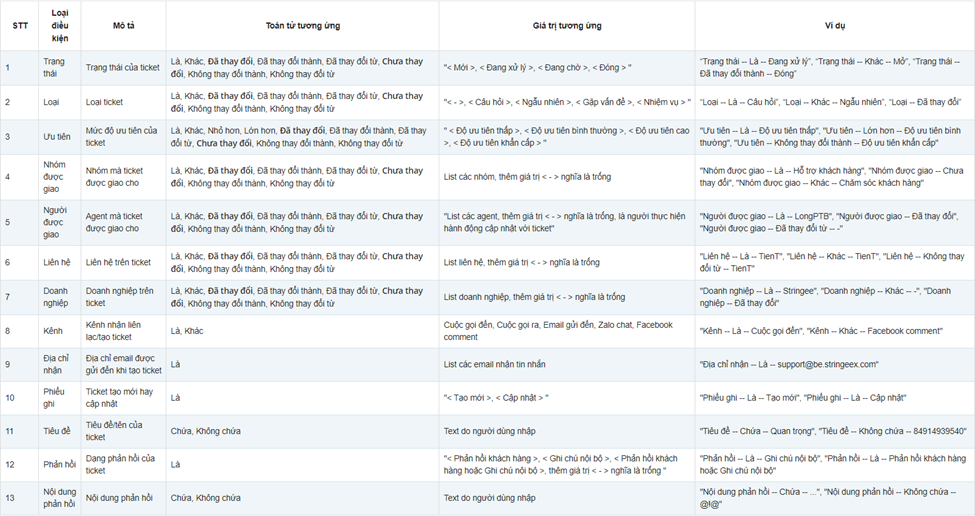
## Conditions:
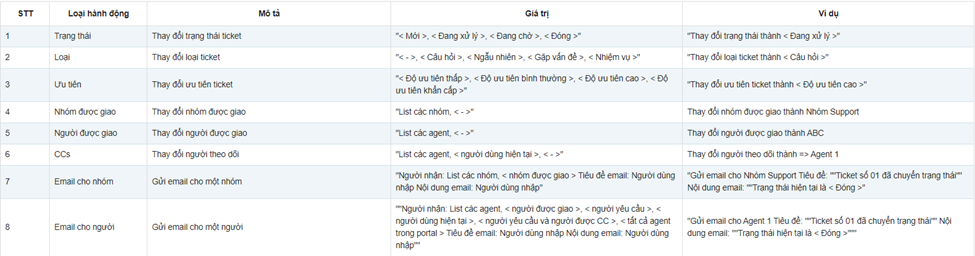
## Actions:
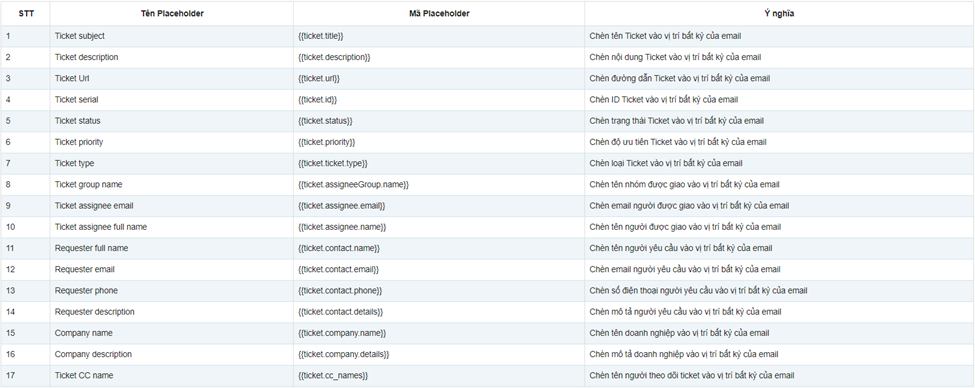
## Placeholder:
## Steps to create a new trigger
* **Step 1:** Select add new trigger
* **Step 2:** Create conditions for trigger
* **Trigger name:** set by the company, is a required field
* **Description:** is a detailed description of the trigger, is an optional field
* **Condition:** includes one (or several) criteria that must be met for the action to take place
* Meet ALL conditions: when all the conditions here are met, the system triggers the trigger action
* Meet ONE of the conditions: when one of the conditions here is met, the system triggers the trigger action.
* **Step 3:** Create an action for the trigger. Admin combines the actions according to the instructions above.
* **Step 4:** Select Create New to save the Trigger or Cancel to cancel the current operation. Trigger after being created defaults to Active status